Your DNIe on your Mac: read it, sign in and sign documents.
DNIe for Mac reads your electronic ID card, signs you in to Spain's e-government sites and signs your documents in the standard European formats. In your language, in every browser — and without a single byte leaving your Mac.
Reading and signing, free · macOS 13+ · USB smart-card reader · español, català, euskara, galego
ISO/IEC 7816-4 · CWA 14890 · PKCS#15
» DNIe detected — generation 3.0
» CWA-14890 secure channel established · 9000✓
» signing certificate: valid
» signed (PAdES) · RFC-3161 timestamp ✓
Three gestures
Read. Sign in. Sign.
Everything the DNIe can do, built for the Mac: insert the card and DNIe for Mac takes it from there.
Read
Your card, opened up
Insert your DNIe into the reader and DNIe for Mac connects on its own: it opens the secure channel, checks your certificates and — with your PIN — shows your full identity record and your photograph. It detects your card's generation (1.0 through 4.0) and tells you if anything is out of order.
IDENTITY DATA · PHOTOGRAPH · CERTIFICATES
Sign in
Your DNIe in Safari, Chrome, Edge and Firefox
With DNIe Pro you sign in with your DNIe to the Tax Agency, Social Security or the DGT from Safari, Chrome, Edge and Firefox: the certificate shows up in the browser's own dialog. The Police's official software for Mac, by contrast, is built for Firefox. Step by step: the DNIe in Safari, Chrome and Edge on a Mac.
SAFARI · CHROME · EDGE · FIREFOX · AUTOFIRMA
Sign
Sign PDFs with your DNIe, no Adobe
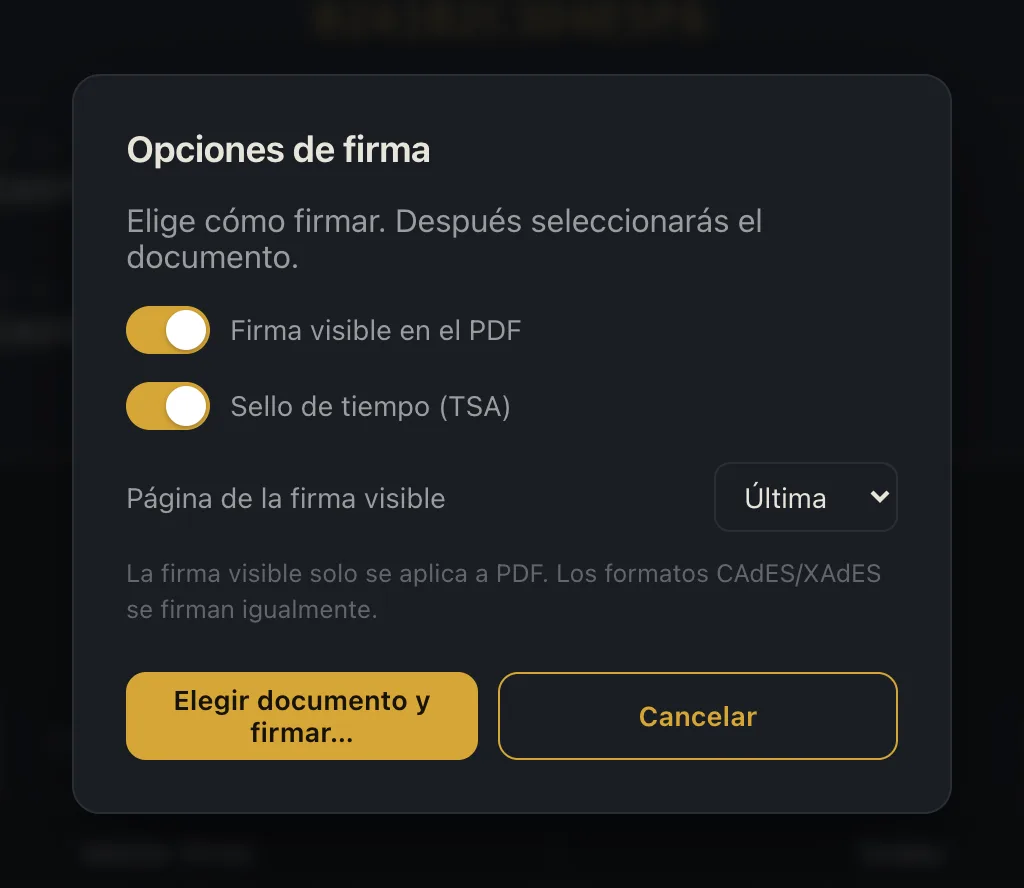
Sign PDFs and any other file in PAdES, CAdES or XAdES with the full certificate chain, an RFC-3161 timestamp and — if you want it — a visible signature stamp with your logo on the first, last or every page. Right inside the app. Step by step, and why Preview's signature is not an electronic signature: how to sign a PDF with the DNIe on a Mac.
PAdES · CAdES · XAdES · RFC-3161
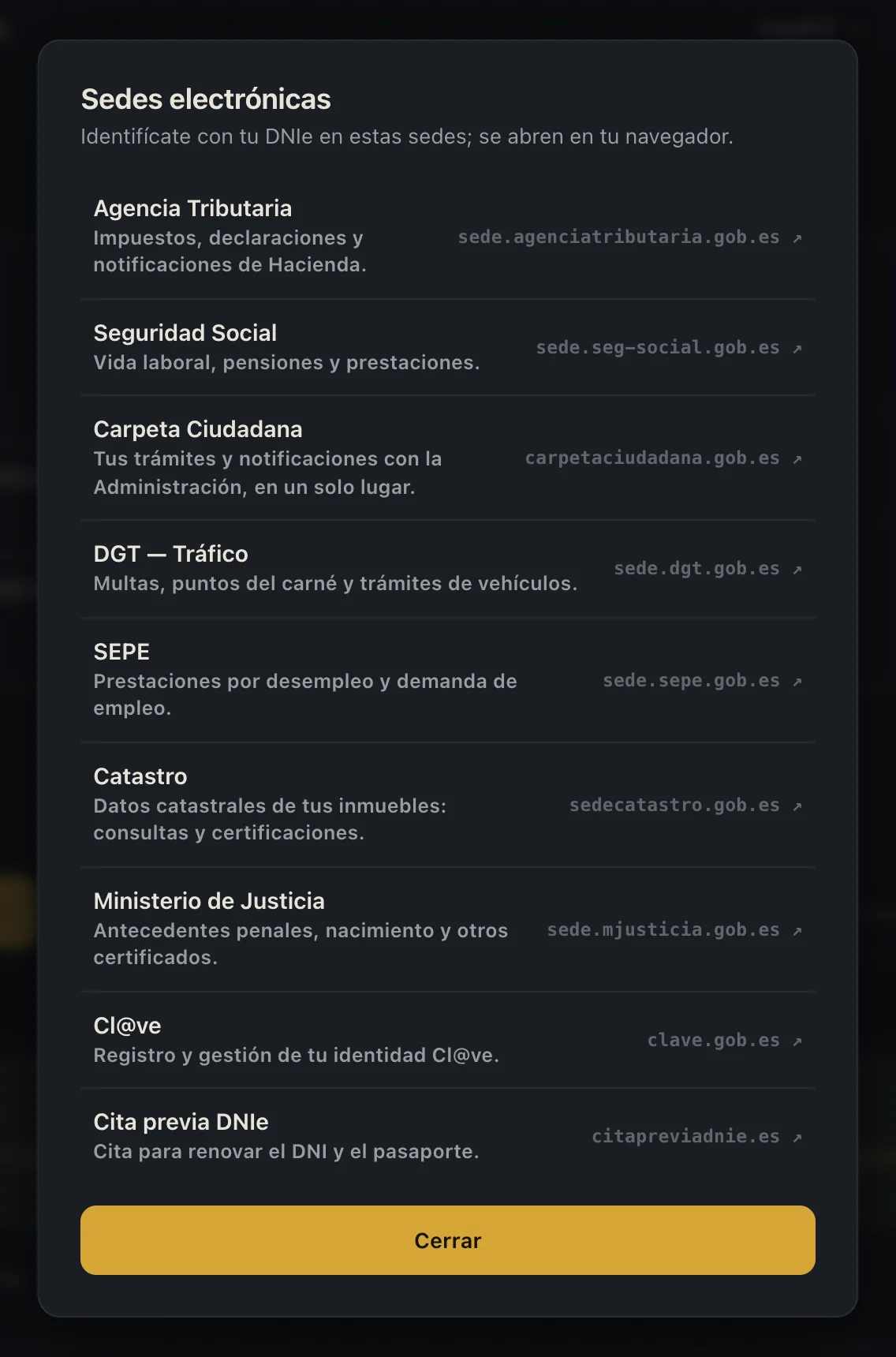
Signing: visible signature and timestampE-government portals, one click away
How it works
Everything happens on your Mac.
DNIe for Mac talks to your card through the reader, over the secure channel the DNIe itself defines. There is no server in between, no account to create, no "cloud". This website uses exactly one third-party resource — Google Analytics — and only if you explicitly accept it.
Your PIN
Travels encrypted from your keyboard to the card, inside the secure channel. It is never stored, never logged, never sent anywhere.
Your data
Your identity record and photograph are read from the chip and stay on your screen. Documents you sign are saved wherever you choose.
Telemetry
Zero in the app: no analytics, no identifiers, no "usage statistics". On this site, Google Analytics is optional and only switches on if you accept it.
Network
The only outbound connections: OCSP (ocsp.dnie.es) to check that a certificate has not been revoked and — only if you enable timestamping — the TSA service. Purchases are processed by Apple. All spelled out in the privacy policy.
And when things go wrong, it still helps: if your PIN is blocked or your certificates have expired, DNIe for Mac doesn't stop at a cryptic error — it tells you exactly what to do and where.
Four co-official languages
In your language, for real.
The interface, the system dialogs and the help guides, natively translated into Spain's four co-official languages. Not as an afterthought — as a principle. (The app itself has no English interface, only these four.)
Firmar documentoEspañol
Signa el documentCatalà
Sinatu dokumentuaEuskara
Asinar o documentoGalego
Pricing
Reading and signing with your DNIe: free, for good.
The essentials cost nothing and never expire: read your card, sign your documents and validate the ones you receive without paying, without an account and without a clock running. Exactly one feature is paid — DNIe Pro, your DNIe inside the browser — and it is optional. Native Apple In-App Purchase: no web checkout, no card numbers in forms.
Free, for good
€0 no account, no expiry
Read your personal data and your photo from the chip, protected by your PIN.
Sign PDFs (PAdES, with a visible signature and a timestamp), CAdES and XAdES.
Validate any signed PDF: integrity, chain of trust, revocation (OCSP) and timestamp.
Launcher for e-government portals: Tax Agency, Social Security, Carpeta Ciudadana, DGT, SEPE, Catastro and more.
Warnings and step-by-step guidance for a blocked PIN or expired certificates.
Demo mode, to try the app with no card and no reader.
DNIe Pro · annual subscription
€9.99/year
Your DNIe inside Safari, Chrome, Edge and Firefox, to sign in to Spain's e-government sites. Includes a 3-day free trial; renews automatically and you cancel it whenever you like from your App Store settings.
DNIe Pro · lifetime
€44.99 once
The same feature as a single payment: DNIe Pro is unlocked permanently for your Apple account. No renewals.
Reading, signing and validating stay free even if you never buy DNIe Pro — there is no trial period counting down on them. The annual subscription includes a 3-day free trial and renews automatically unless you cancel it at least 24 hours before the end of the period; manage it from your App Store settings. "Restore Purchases" is always available in the app. Details in the terms of use.
Frequently asked questions
Worth knowing.
Is this an official app?
No — and we say so on every screen. DNIe for Mac is an independent product by nexoapex. It is not affiliated with or endorsed by the Dirección General de la Policía, the Ministry of the Interior or the Government of Spain.
What does that mean in practice? Your DNIe and its certificates are official — the Police issue them — and the signatures you produce follow the European standards (PAdES, CAdES, XAdES), the same ones AutoFirma uses. DNIe for Mac is the tool you use them with on your Mac, just as a PDF reader doesn't become part of the BOE (Spain's official gazette) by opening it.
How do I install the DNIe on a Mac?
You don't install the DNIe itself: its certificates' private keys live on the chip and never leave the card. What you install is the software that reads it, and there are two routes.
The Police's official route: the libpkcs11-dnie PKCS#11 module, with packages for Intel and Apple Silicon Macs (version 1.6.8 as of 16 September 2026). Its instructions only explain how to load it into Firefox, and you have to do that by hand: we walk you through it in our guide to the DNIe in Firefox on a Mac.
DNIe for Mac: plug in a USB contact card reader, install the app from the Mac App Store and insert the card. Reading, signing and validating are free; signing in from Safari, Chrome, Edge and Firefox is DNIe Pro.
After 3 wrong attempts the DNIe locks itself, and there is no PUK: the only way to set a new PIN is in person. The good news: no appointment needed.
Go to a DNIe issuing office (a police station) with your card.
Use a DNIe Update Point (PAD, Punto de Actualización del DNIe): these are self-service kiosks.
Identify yourself with your fingerprint and set a new PIN.
It cannot be unblocked over the internet or by phone. DNIe for Mac detects the blocked state and shows you this same guidance inside the app. Official information at dnielectronico.es. Full guide: blocked or expired PIN.
My certificates have expired. Is the card useless now?
The card still works: DNIe certificates expire every two years, before the physical document does. With expired certificates you can still read your data, but no portal will let you sign in or sign.
Renewing them is free and needs no appointment: at a DNIe Update Point (PAD) in any issuing office (police station), fresh certificates are generated onto the same card with your PIN and your fingerprint. There is no online renewal. DNIe for Mac warns you about expiry when it reads the card. Details at dnielectronico.es. If the physical document itself has expired, book an appointment at citapreviadnie.es. Full guide: blocked or expired PIN.
Will it work with my DNIe? (generations 1.0 to 4.0)
DNIe for Mac works with a contact smart-card reader (USB, CCID class) and detects your DNIe's generation automatically.
DNIe 1.0 and 2.0: contact-only cards — they have no NFC, so a reader is their only interface. DNIe for Mac identifies them and labels them as such.
DNIe 3.0 and 4.0: add NFC on top of the contact chip. With DNIe for Mac you use them through the reader, like the rest.
What about AutoFirma? And Firefox?
If a portal asks for AutoFirma, you need it; it can sit on the same Mac as DNIe for Mac. AutoFirma reads the DNIe on its own, with its own Java driver, JMulticard, which is on by default.
Sign-in goes through macOS's native integration (CryptoTokenKit): your DNIe certificate shows up in the browser's own dialog, in Safari, Chrome, Edge and in Firefox too, which on macOS reads the system's client certificates out of the box. That in-browser sign-in is the paid feature, DNIe Pro. Full comparison: AutoFirma on Mac. If you'd rather take the official route in Firefox, without the app: the DNIe in Firefox on a Mac.
What do I need to get started?
A Mac running macOS 13 or later, a USB contact card reader, your DNIe and its PIN. Nothing else: no Java, no system tweaks, no odd configuration profiles.
Any reader that follows the CCID standard will do: macOS recognizes them without installing drivers. Make sure it is a contact reader — with a slot for the chip — not NFC-only, and if your Mac only has USB-C ports, prefer a direct adapter over an unpowered hub. Not sure about yours? See which DNIe card reader works on a Mac.
What is free and what is paid?
Reading your DNIe, signing in PAdES, CAdES and XAdES and validating signed documents are free for good: no account, no expiry, no trial period counting down.
The only paid feature is DNIe Pro, which adds signing in with the DNIe inside Safari, Chrome, Edge and Firefox: €9.99 a year with a 3-day free trial, or €44.99 once. It is bought through Apple's In-App Purchase; you can check and change the status of your purchases and subscriptions at any time from your App Store settings.
Community
Questions? Ask us in the channel.
We post release notes, compatibility alerts for the Spanish e-government portals, and step-by-step guides. If something does not work, tell us there — we usually reply the same day.
Now available on the Mac App Store, listed there as "DNIe - Firma y autenticación" · free to read, sign and validate · macOS 13 or later and a USB card reader. Questions before you install? Email us.
This site uses Google Analytics, but only with your permission: until you give it, no Google resource loads and no analytics cookie is set. You can change your mind anytime. More in the privacy policy.