App for iPhone and Android
Read your Spanish DNIe with your phone over NFC: the DNIe NFC app for iPhone and Android
Last updated: · by David Pelayo (nexoapex)
“DNIe NFC: Spanish ID & e-sign” (in Spanish, “DNIe NFC: firma y trámites”) is NEXO APEX S.L.'s app that turns your phone into a reader for the Spanish electronic ID card, the DNIe. Hold a DNIe 3.0 or 4.0 against the back of your iPhone or Android phone and the app reads the chip over NFC: your details, your photo and your certificates. With the same tap you can sign a PDF or log in to Spanish government e-offices (sedes electrónicas) that accept the DNIe. No card reader needed, and your DNIe and PIN never leave the phone.
iPhone with iOS 17 or later · Android 8.0 or later with NFC · DNIe 3.0 or 4.0 · free with ads
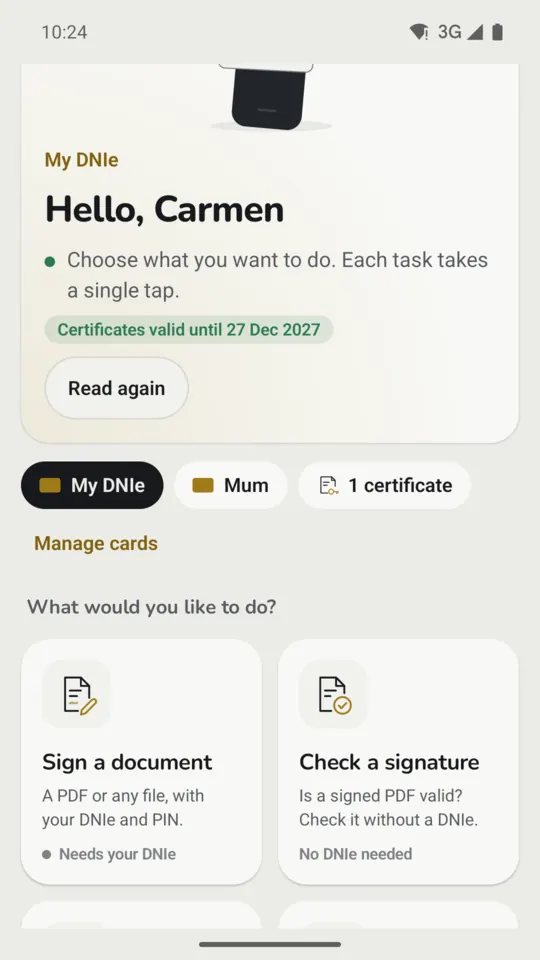
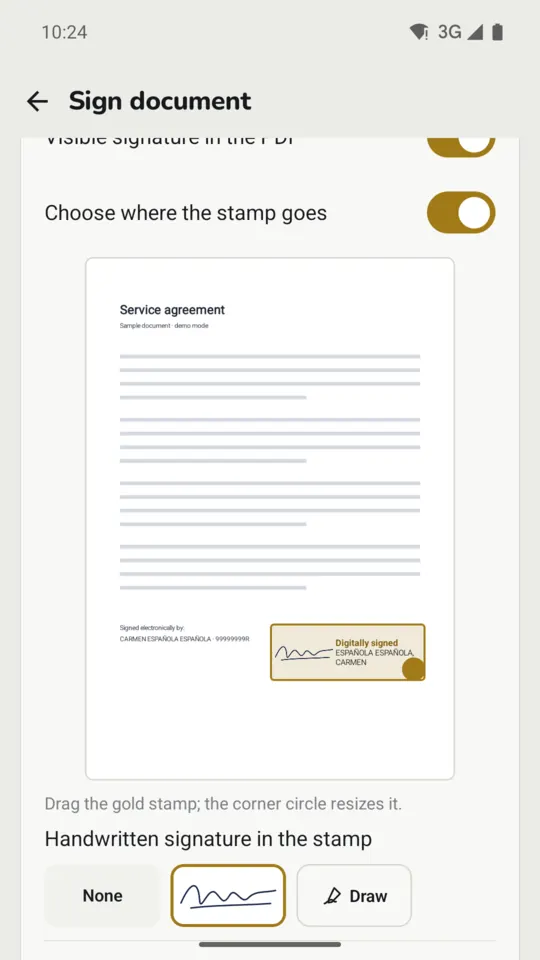
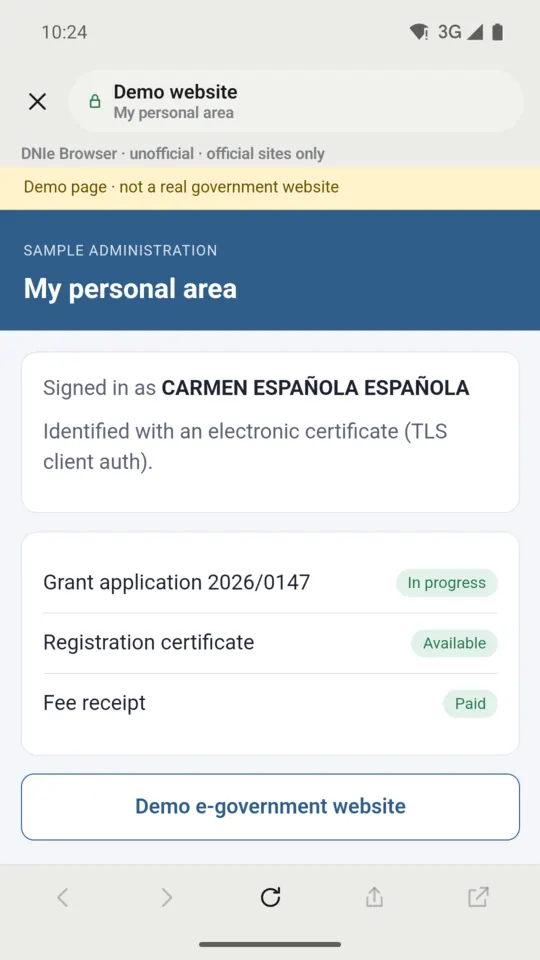
Real screenshots of the app on Android, with a demo card.
What the DNIe NFC app does
- Reads your DNIe over NFC: name, number, expiry date, address and photo, plus the status of your authentication and signing certificates, with a reminder before they expire.
- Signs documents: PDFs in PAdES format with a visible stamp, and any other file with a detached CAdES signature (.csig). It also validates signed PDFs.
- Logs you in to e-offices from its DNIe Browser, with the DNIe or with a .p12 or .pfx certificate (Plus and Pro plans).
- Procedures: a catalogue of nearly 200 common procedures and a guide to getting an FNMT certificate.
- Passports and TIE/NIE cards: reads their chip and checks the data has not been altered.
- Several cards: yours and a relative's, for example, each with its own CAN.
How to read the DNIe with your phone over NFC
The DNIe 3.0 (2015) and 4.0 (2021) carry, besides the contact pads, a contactless chip that a phone reads over NFC. To open the connection the card asks for its CAN; to sign or log in it also needs your PIN.
- Have the CAN to hand: the 6-digit number printed on the front of the DNIe. The app asks for it the first time and stores it encrypted (in the iPhone keychain or the Android encrypted store); you can delete it at any time.
- Find the NFC antenna. On an iPhone it is at the top of the back. On Android its position depends on the model: it is usually in the middle or the upper half of the back.
- Hold the DNIe flat against that area and keep it still until the reading finishes.
- Type your PIN when the app asks for it to sign or log in. It is only kept in memory for a few minutes, to retry a tap that failed, and is never written to storage.
If it is not detected: remove the case if it is thick or metal, check on Android that NFC is switched on, check the CAN and try again without moving the card. If your PIN is blocked or forgotten, no app can unblock it: it is changed at a police DNIe Update Point, as our blocked or expired PIN guide explains. A DNIe older than version 3.0 has no NFC and can only be read with a card reader.
Signing with the DNIe from your phone
The app signs with your DNIe's signing certificate: PDFs in PAdES, with a visible stamp on the page, and any other file with a detached CAdES signature (.csig). The signing key never leaves the chip, so every signature asks you to hold the DNIe to the phone and type the PIN.
The Free plan includes basic PDF signing. With Plus or Pro you place the stamp wherever you like and add your handwritten signature, a timestamp and long-term validation (LTV), and the app checks the certificate for revocation before signing. It also validates a signed PDF: who signed it, when, and whether it changed afterwards. Why a drawn signature is not an electronic signature is explained in how to sign a PDF with the DNIe, our guide for Mac.
Logging in to e-offices with the DNIe or a certificate
With Plus or Pro, the app's DNIe Browser opens the e-office (sede electrónica), asks you to hold the DNIe to the phone when the site requests your certificate, and logs you in with your authentication certificate. Software certificates (.p12 or .pfx), such as an FNMT certificate, work too: you import them into the app and the private key stays in the phone's secure store and cannot be exported again, so keep your own copy of the file.
It works on e-offices that accept the DNIe or an electronic certificate. The procedures catalogue shows for each entry whether its site accepts the DNIe, an e-certificate or Cl@ve. If you don't have an FNMT certificate yet, the app includes a guide to requesting one; from a computer, see how to get an FNMT certificate with your DNIe.
Nearly 200 procedures, passports and TIE/NIE cards
The catalogue gathers nearly 200 common procedures, such as income tax, work history, driving licence points, criminal record certificates, land registry certificates and the regional e-offices, and opens each on its official site. The FNMT guide covers requirements, steps and renewal reminders.
The app also reads the chip of passports and foreigner ID cards (TIE/NIE) using the MRZ details, scanned with the camera. “Data intact” means what was read matches the chip's signed digests; it does not check the issuing country's certificate chain, so it is no substitute for an official check.
Plans and pricing
- Free, with ads: read your DNIe and your details, passports and TIE cards, validate signatures, procedures catalogue, FNMT guide and basic PDF signing.
- Plus, €12.99/year, with ads: every feature.
- Pro, €19.99/year, no ads: every feature, with a 3-day free trial.
Subscriptions are bought with your Apple or Google account and renew automatically every year unless cancelled at least 24 hours before the end of the period. Details are in the app's terms; how to restore purchases or cancel is in the app's help.
Requirements: which phone and which DNIe you need
- An iPhone with iOS 17 or later. Every iPhone that supports iOS 17 has NFC. The iOS app is for iPhone only: it is not available for iPad.
- An Android phone with Android 8.0 or later and NFC.
- A DNIe 3.0 or 4.0, the versions with NFC, with its CAN and your PIN to sign or log in.
Privacy: your DNIe and your PIN never leave the phone
All work with the card happens on your phone: no accounts, no servers of ours and no analytics. The only connections are revocation checks (OCSP) and timestamps with certificate authorities, the e-offices you open, purchases through Apple or Google and, on the Free and Plus plans, non-personalised ads, never on screens with your personal data, the PIN or the DNIe reading. It is all in the app's privacy policy.
What about DNIe for Mac?
DNIe for Mac is a different product from the same team: a macOS app that reads the DNIe with a USB card reader and brings it to Safari, Chrome, Edge and Firefox. They are separate apps with separate purchases: one does not replace or unlock the other.
Frequently asked questions about the DNIe on a phone
Can I read the Spanish electronic ID card with my phone?
Yes, if your DNIe is a 3.0 or 4.0, which have NFC, and your phone has NFC too: an iPhone with iOS 17 or later or an Android 8.0 or later phone. The app reads the chip with the CAN printed on the card; to sign or log in you also need the PIN.
Where is the CAN on the DNIe?
It is the 6-digit number printed on the front of the card. The app stores it encrypted on the phone so it doesn't have to ask every time, and you can delete it at any time.
How do I know whether my phone has NFC?
Every iPhone that supports iOS 17 has NFC. On Android, search for “NFC” in Settings: if it appears, switch it on; if it doesn't, the phone has no NFC and cannot read the DNIe.
Can I sign a PDF with the DNIe from my phone?
Yes. Basic PDF signing (PAdES) is free. With Plus or Pro you choose where the stamp goes and add your handwritten signature, a timestamp and long-term validation (LTV). Other files are signed with a detached CAdES signature.
Can I log in to Spanish e-offices with the DNIe from my phone?
Yes, on the Plus or Pro plans: the app's DNIe Browser logs you in with the DNIe or a .p12 or .pfx certificate on e-offices that accept the DNIe or an electronic certificate.
How much does the DNIe NFC app cost?
It is free to download and the Free plan has ads. Plus costs €12.99/year, with ads, and Pro €19.99/year, without ads and with a 3-day free trial. Subscriptions are managed in your Apple or Google account.
Is it an official Spanish Police app?
No. It is an independent app by NEXO APEX S.L., not affiliated with or endorsed by the Spanish National Police, the FNMT, the Tax Agency or any other government body. The Police's official app for carrying your ID on a phone is MiDNI, which is unrelated to this one.
Do my PIN or my details leave the phone?
No. The PIN is only kept in memory for a few minutes and is never written to storage or logged. The card data stays on the phone: the app has no accounts, no servers of ours and no analytics.
What do I do if my DNIe PIN is blocked?
No app can unblock it, because the DNIe has no PUK. It is changed in person at a DNIe Update Point (PAD), free and without an appointment; our blocked or expired PIN guide explains how.
Already have the app? Its help page explains how to restore purchases, cancel a subscription and contact us. Legal documents: privacy policy · terms of use and subscriptions.
Unofficial app. “DNIe NFC: Spanish ID & e-sign” is an independent app by NEXO APEX S.L. It is not affiliated with or endorsed by the Spanish National Police, the FNMT, the Tax Agency or any other government body. Procedures are completed directly on each organisation's own website.